
Presentation management software, built into PowerPoint
SlideHub is presentation management software that lives inside PowerPoint and Microsoft 365. Keep every slide in one governed library, assemble on-brand decks from approved content in seconds, and update a slide once to refresh every presentation that uses it - so the whole platform runs where your team already works.

What is presentation management software?
Presentation management software is the platform a team uses to centralise, govern, and update its slide content from one source, so everyone builds presentations from approved, current material instead of scattered files. G2 and FitGap both recognise it as a distinct software category, not a marketing label. It replaces the shared folder with a single source of truth for every slide.
Scattered decks
Slides live in inboxes, drives, and laptops, so people rebuild content that already exists somewhere - and waste hours hunting for it.
Outdated slides
Old figures, prices, and logos keep resurfacing in live presentations because there is no way to update a slide everywhere at once.
Brand drift
Every edited copy drifts a little further from the brand, until no two client decks look like they came from the same company.
A platform that lives inside PowerPoint
Most enterprise deployments run as a Microsoft 365 add-in built on the Office.js framework, so the library, search, and deck builder open in a side panel right inside PowerPoint, Word, Excel, and Outlook - on PC, Mac, and Microsoft 365 Online. IT deploys it centrally with no code on user machines, and your team manages presentations without leaving the apps they already use.
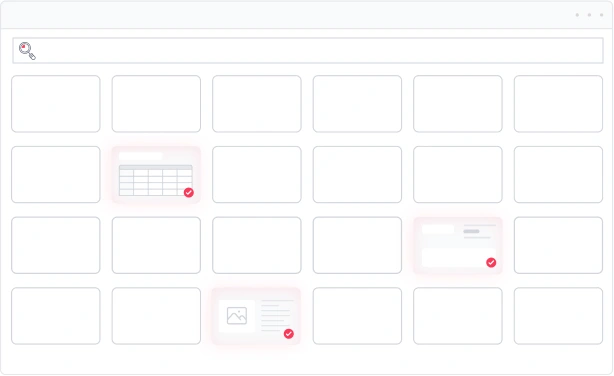
One governed library for every presentation
Bring scattered decks into a single, governed source of truth. Every approved slide lives in one place, owned by someone, searchable at the slide level inside PowerPoint, SharePoint, and Teams.
- Replace shared drives with one managed source of truth
- Search every slide by topic, tag, or on-slide content
- Assign ownership so nothing goes stale unnoticed
Assemble an on-brand deck in seconds
Pull approved slides into a presentation, reorder with a drag, and let dynamic placeholders swap client names, figures, and visuals automatically - so a tailored proposal takes minutes, not an afternoon.
- Drag approved slides into a deck and reorder instantly
- Swap client names, data, and logos with placeholders
- Export a finished, on-brand deck straight to PowerPoint
Update one slide, refresh every deck
A root slide holds the canonical version; linked slides across the organisation receive the update automatically. Edit once and every deck built from that slide refreshes - outdated content stops reaching clients.
- Propagate one edit to every deck through linked slides
- Notify everyone working on an affected slide automatically
- Lock compliance-critical slides so they never change
Distribute decks and see what lands
Send finished presentations as a trackable link and see who opened them and which slides held attention - so distribution feeds back into a sharper library over time.
- Share decks as a secure, trackable link
- See opens and slide-by-slide engagement
- Track usage to learn what content actually works





















How the system works: library → assembly → distribution
Presentation management software turns slide content into one connected system. Content flows from a governed library, into assembled decks, out to your audience - and the usage data flows back to keep the library sharp.
Library
Every approved slide, template, and asset is stored, tagged, and owned in one governed library - the single source of truth your whole team searches at the slide level.
Assembly
Teams pull approved slides into tailored decks and let placeholders personalise them in seconds - every presentation on-brand and current by construction.
Distribution
Finished decks go out as trackable links, and the engagement data flows back into the library - so the system keeps getting smarter with every send.
The six pillars of presentation management software
A complete platform delivers six capability pillars. Together they turn presentation content into operational infrastructure rather than a folder of files.
Slide library
A centralised, slide-level searchable repository of approved slides, surfaced inside PowerPoint rather than buried in folders.
Version control
Slide-level versioning that propagates a single edit from a root slide to every deck that uses it.
Brand compliance
Approved templates and governed assets enforce visual, verbal, and structural identity at the moment of creation.
Presentation governance
Access control, content integrity, and approval workflows for regulated and risk-sensitive content.
AI for presentation management
Template-based generation, semantic search, and auto-tagging that operate only inside your approved content boundary.
Presentation analytics
Slide usage, content-gap analysis, and recipient engagement that turn the library into an instrumentable capability.



Presentation management software vs adjacent categories
Organisations often weigh presentation management software against four adjacent categories. The overlap is frequently complementary, but slide-level operations inside PowerPoint are where a dedicated platform pulls ahead.
Presentation management software is the right choice when an organisation produces high volumes of presentations from a common content pool, runs multiple teams reusing the same content, and needs approved content to propagate across every instance. The commercial side - licence models and cost benchmarks - is covered on presentation management software pricing.
Rated 4.9 by the people who use it every day
SlideHub is a Leader in Presentation Management on G2, with awards across implementation, support, and ease of doing business. Every medal is earned from verified customer reviews.
Read customer stories





Teams that run on SlideHub presentation management
 Business advisory
How Cannings Purple increase the efficiency in building proposals

 Investment
How NorthCoast stays compliant while allowing sales to remain flexible

 Workspace solutions
How Holmris B8 reclaimed 80% of presentation time and transformed content sharing company-wide

Presentation management software questions, answered
What is presentation management software?
How is it different from storing presentations on a shared drive?
Does it work inside PowerPoint and Microsoft 365?
How does the platform keep presentations on-brand and compliant?
Is it suitable for enterprise presentation management?
See presentation management software in action
Book a 30-minute walkthrough. We'll show you the governed library, deck assembly, and one-click updates working inside your own PowerPoint and Microsoft 365.