
Enterprise-grade control, without enterprise-grade complexity
Manage all your presentation content across the organisation in one platform that works natively across Microsoft 365 on PC, Mac, and the web.

Update once, change everywhere & notify users
Update one slide and push the change to every deck that uses it. Lock compliance-critical slides, merge duplicates, and approve contributions from across the organisation, all from one place.
- Govern content centrally across every team
- Lock compliance-critical slides from being edited
- Role-based permissions and approval workflows
Find any slide in seconds
Give every team access to on-brand, up-to-date approved slides using powerful AI search built right into PowerPoint, SharePoint, and Teams.
- Search the whole organisation's library by topic, tag, or content
- Find the right slide or describe what you need to let the AI create it
- Filter by category, tags or labels instantly
Build slides on-brand, every time
Generate slides with AI that uses your approved templates and content, or start from 4,500+ professionally designed templates. Always on-brand, no reformatting needed.
- AI builds and redesigns slides from your own content and templates
- Library of 4,500+ ready-to-use slide templates
- Every slide stays inside your brand guidelines
Save hours on deck building
Set up logic and placeholders to automate proposals, tombstones, CV decks, and more. Pull data, swap content, and assemble easily.
- Build proposals from approved slide groups in minutes
- Use placeholders to swap client names, data, and visuals
- Generate tombstones and CV decks automatically
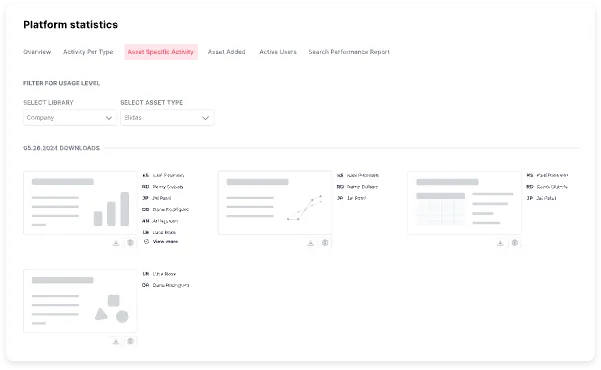
Use detailed data to optimize the library and drive adoption
Track which slides get used, what your teams search for but can't find, and where to focus next, so your library only gets stronger over time.
- Track usage, downloads and user-specific activities
- Spot content gaps from real search behaviour
- Make informed decisions about what to cut or create





















Enterprise governance for your entire presentation library
Roll out one governed home for presentation content across every team, with the control IT and brand owners need and the simplicity end users actually adopt.
Central governance
Manage and approve presentation content org-wide from one place, so every team works from the same approved source.
Roles & permissions
Control who can edit, approve, and publish with role-based permissions and approval workflows.
SSO, SCIM & 2FA
SAML single sign-on and SCIM provisioning keep access in step with your identity provider, with optional two-factor authentication for an extra layer. New hires get access automatically, and leavers lose it the moment they go.
Audit logs
A full activity record of who changed, approved, and published content, so you can answer security and compliance reviews with evidence.
Native to Microsoft 365
Works natively across PowerPoint, SharePoint, and Teams on PC, Mac, and the web, so adoption is fast and IT overhead is low.
Update at scale
Update one slide and push the change to every deck across the organisation, so nothing goes out stale.
Org-wide search
Every team finds the right approved slide in seconds, instead of recreating content that already exists.
Adoption analytics
See what gets used and searched for across teams, so you manage the library around real behaviour.
Govern every team from one place
Approve content centrally, set role-based permissions, and lock compliance-critical slides, so the whole organisation works from the same approved, on-brand source.
Manage the library with real data
See which content teams use, what they search for but can't find, and where adoption is strong, then manage your library around what the organisation actually relies on.



Give your colleagues an unfair advantage
The same platform that governs your content org-wide also hands every team three things they couldn't do before.

Customise a full presentation in seconds
Pick approved slide groups, let placeholders fill in the client details, and a tailored, on-brand deck is ready in minutes.
See how it works
Build new slides with on-brand AI
Describe the slide you need and AI builds it from your own templates and content, always on-brand, with no reformatting.
Explore SlideHub AI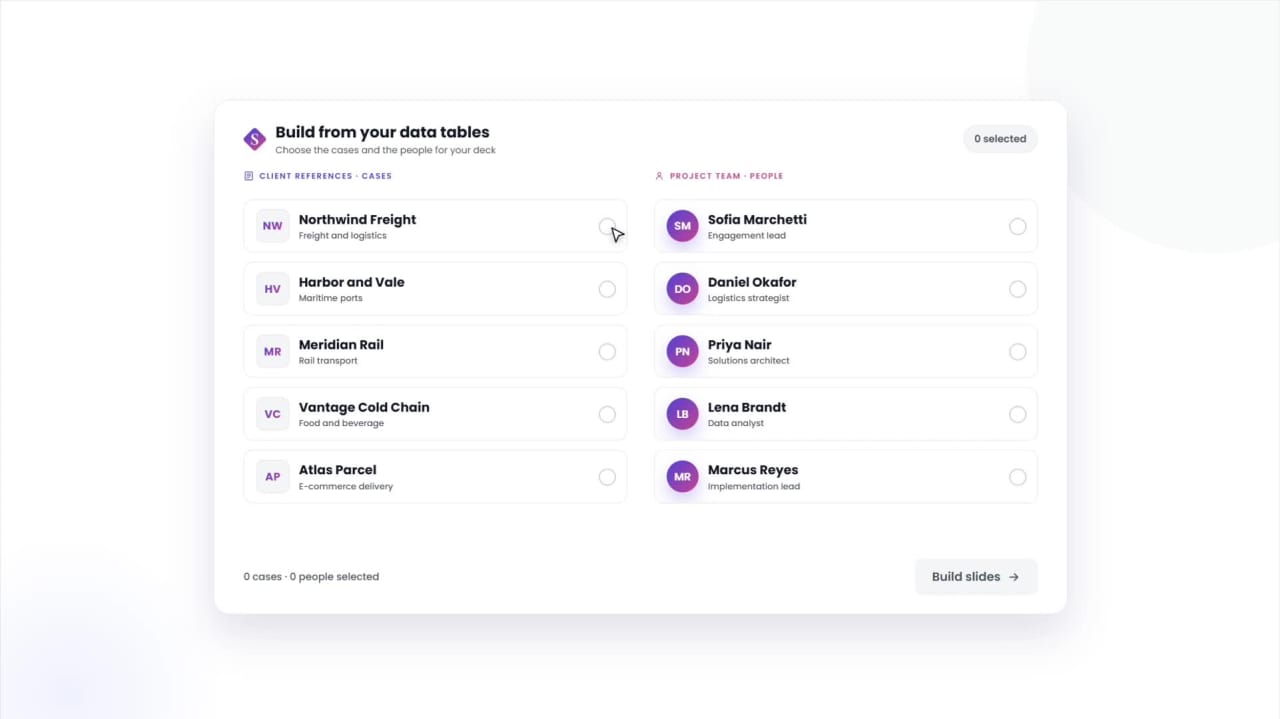
Manage tombstones, bios & cases in a structured data table
Keep deal tombstones, team bios, and reference cases in one table, and build any slide from the entries you pick.
See Data TablesRated 4.9 by the people who use it every day
SlideHub is a Leader in Presentation Management on G2, with awards across implementation, support, and ease of doing business. Every medal is earned from verified customer reviews.
Read customer stories





See how other organisations manage at scale





Enterprise presentation management questions, answered
What is enterprise presentation management?
Does it work across Microsoft 365?
Can we control permissions and approvals?
Is SlideHub secure and compliant enough for enterprise and regulated teams?
How hard is it to roll out?
Can we see adoption across teams?
How is SlideHub priced?
See enterprise presentation management without the complexity
Book a 30-minute walkthrough. We'll tailor it to how your organisation manages presentation content today, and show the governance without the overhead.