Find content in seconds
Your colleagues will find on-brand content in seconds with fast and powerful search


Search both text and labels
Search and find the slide you need via keywords and label search at once


Control versioning and permissions
Help your colleagues use the latest up-to-date materials


Browse newly updated slides
Find slides that your organization has recently updated


Peace of mind with historical versions
See and restore older slide versions
Customize slides using placeholders
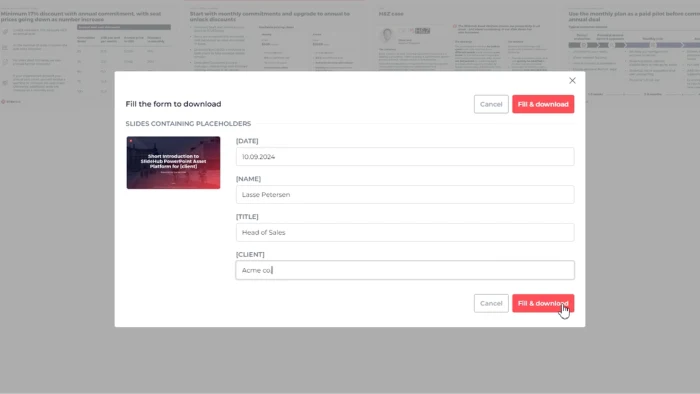
Save time and eliminate errors of "find and replace" by automating the process with slide content placeholders
How clients use placeholders
Create tailored proposals
Creating a proposal tailored to each client, including slides with your company's details and customized information for each client, such as their name, company name, industry, and current date
Update company data across presentations
You want efficient updates of default company values scattered throughout the presentation, such as your employee count, and how many clients you currently serve
Auto-update contact information
No need to create new contact information templates for each project.
Use a single contact slide template in combination with placeholders to drive standardization
Use a single contact slide template in combination with placeholders to drive standardization
Effortless customize project kick-off templates
Using the same best-practice templates, while efficiently updating the client's name, the project code/references, roadmap deadlines, etc. in many different projects
Combine placeholders w. locked slides
Placeholders can be used in combination with locked slides to customize key content of sensitive slides

Fully lock sensitive slides
Ensure content consistency by locking the global slides, while still allowing customization with dynamic content.


SlideHub helps us be more on-brand without sacrificing the creativity of our consultants


bernd pirner
Senior art director
Senior art director

Organize and update in seconds
Update slides that are in multiple presentations in one place
Instant synchronization
Update once – instantly synced everywhere
All content is hosted in the cloud and updates immediately for all users:

Update slides and automatically notify users so they use the most up-to-date slides
Use the same slide across multiple presentations for easy updating


Automatically redact sensitive information
Help keep your organization’s library free from sensitive data


Modern label-based slide management
Say goodbye to legacy folder structures
Modern data structure makes it easy to find what you are looking for and apply changes on multiple slides in one click
Modern data structure makes it easy to find what you are looking for and apply changes on multiple slides in one click


Evaluate value through transparency
See who is using what and how
Track overall usage, what is being used and who is using or lacking behind

Grow via end-user suggestion
Empower your team to suggest slides but remain in control with the slide management software
Grow your library bottom-up
Allow your employees to suggest their preferred slides for approval

Democratize while remaining on-brand
Make sure suggested slides align with the company's branding before allowing them to be used organization-wide
Users can suggest new directly from PowerPoint
Selected members can then review, edit and label relevant slides for future use
Top contributors are recognized for their help


Email signature
Deploy consistent, professional email signatures across your entire organization in one go
Every email, always on-brand
Ensure every employee sends emails with a professional, on-brand signature - automatically across Outlook, Gmail, web, and mobile

Your brand shows up in every email you send
Your brand, your design
Customize the template to match your brand guidelines perfectly your logo, brand colors, and style, locked in across the whole organization
Update everywhere at once
Push a change to your signature template and every employee is updated immediately
One template tailored for everyone
Employees update their own info once and it's saved. Everything else is set by the admin and stays consistent across everyone
Everything in one platform
No need for a separate email signature tool, handle it all from the same place as your brand assets and presentations


Works on all devices
The add-ins are not limited by the type of devices you use but work on PC, Mac, and in the browser