
 Back
Back
webinar
Never rebuild the same slide twice, and see what clients actually read
Timea Borbath · August 7, 2026 · 5 min read
Three bigger releases landed in Q2. Different features, but they trace back to the same annoyance: doing work you've already done once.
Rebuilding a slide whose words you wrote last week. Rebuilding the same client reference slide every quarter, with a different six clients on it. Sending a proposal and then guessing for two weeks.
The full recording is at the top of this post. Here's what shipped, and the two releases already lined up for Q3.
Rebuild the slide you're already on
Generating a slide with AI used to mean describing it from scratch, even when the content was sitting on the screen in front of you.
Now the slide is the prompt. Open one in PowerPoint, click Text-to-Slide, then Rebuild. SlideHub reads what's already on the slide, treats that as the instruction, and comes back with alternative layouts.

You decide how literal it is. Keep the wording exactly as written, or let it rethink the point entirely. You can ask for a different shape too, three bullets where you had five, or another layout type altogether. Generation runs in the background, so the rest of the deck stays workable while you wait.
The rebuild draws on your own library, which is how it knows your products and services. In the demo we ran during the webinar, that detail came straight out of the slides already sitting in the account.
One data table, many slides
Client reference slides, team bios, product overviews. The underlying information barely changes, and yet somebody rebuilds the slide by hand every time a different cut of it is needed.
Data tables replace that with one source. A manager maintains a single table combining text, images and icons, and slides pull from it through the placeholder system, so the table feeds the slide instead of somebody retyping it.
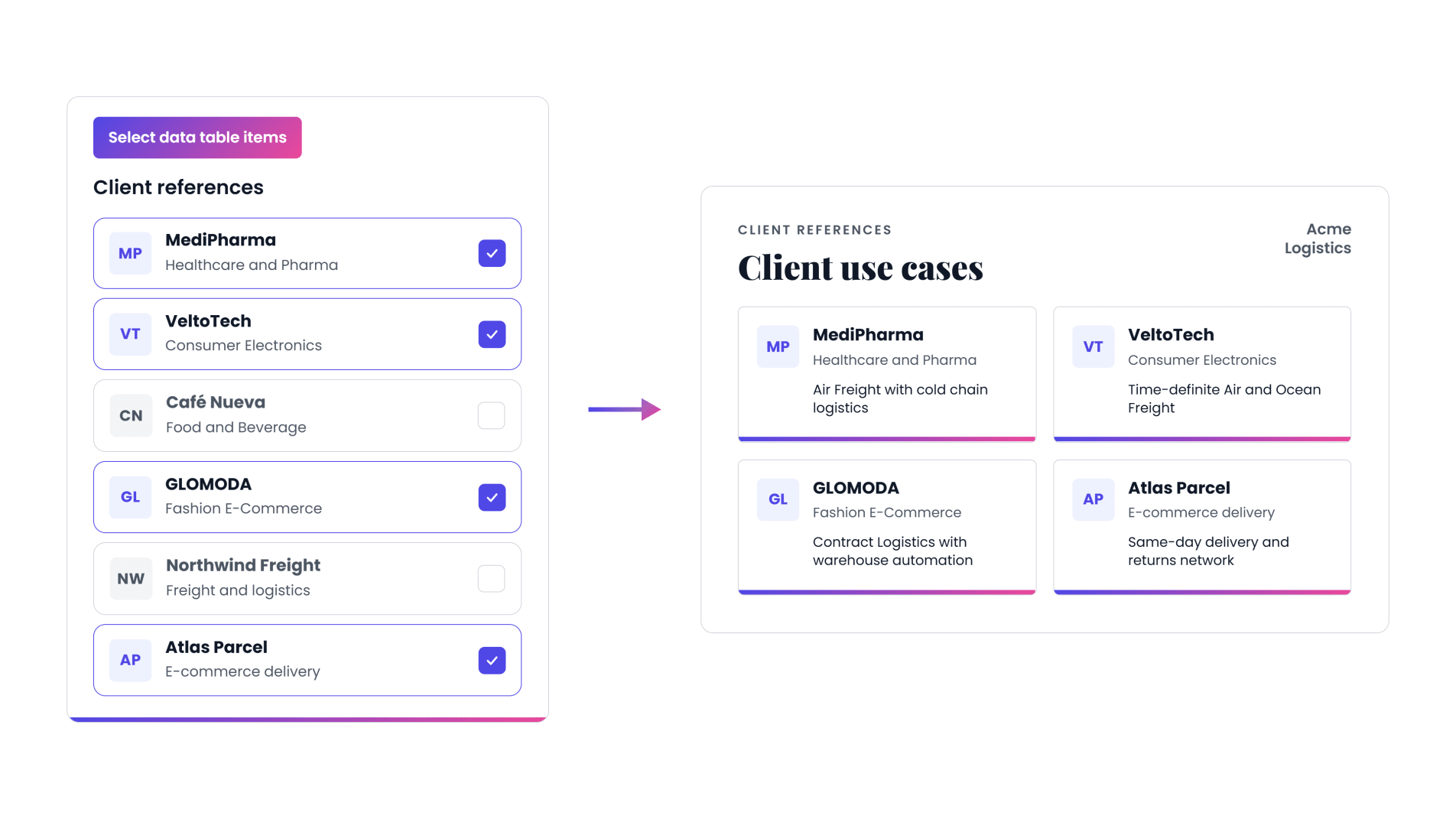
When a user inserts the slide, they filter the table, pick the rows that suit the meeting, sort them and generate. One table can feed a compact six-case reference slide and a two-case version with room for full solution descriptions, pulling a different column for each. Building new layouts on top of the same source turns out to be quick.
The table is reachable through the SlideHub API as well, so it can be kept current by whichever system already holds that data.
There's more coming here. One of the next additions lets each row generate and maintain its own slide, so a table of consultants produces the team overview and an individual slide for every person on it.
Know what happens after you hit send
The third release closes a gap that sat at the end of every deal. You send the deck, and then nothing.
Send & Track bundles a presentation and any supporting files into one link. Add a PDF company description, standard terms, a price list. Password-protect it. Ask viewers for their email before they open it. All of it optional.

For the recipient it's simply easier. One link instead of an attachment too big for email, and any video embedded in your slides stays playable rather than being stripped out the way a PDF export strips it.
The sender finally gets the part that was missing. You can see when the link was opened, from where, on browser or mobile, and which slides actually held attention. Notifications arrive instantly or as a daily or weekly digest, so a follow-up can be timed around what someone has genuinely read.
Why this matters beyond sales
Send & Track closes the SlideHub loop. A governed library feeds what people build, what they build gets shared, and what happens on the client side comes back as insight that improves the library.
For content managers that's the first honest answer to which slides are worth maintaining. We've written up how the whole thing fits together in a separate post.
Nine smaller updates
AI generation. Text to presentation now builds a full deck rather than a single slide, and decks can be built from Claude, ChatGPT or your own systems through MCP and the API.
AI controls. New access-level controls decide who can use which AI features, and admins can disable specific image and icon categories for text to slide.
Library and brand. Partial slide locking keeps chosen shapes fixed while the rest stays editable. Alongside that: a new manage asset interface, custom brand colors across the platform, search-only tags for cleaner labeling, and extended admin-managed settings.
Coming in Q3
Excel Data Link. Link slides to Excel sheets held in SlideHub, then update a large number of slides across the platform with a single click from Excel. It's built for libraries heavy on graphs, tables and recurring reporting.
Here's a short teaser from our testing environment:
Template validation and mass update. SlideHub will check whether a new slide's master matches the ones in your library and flag it when it doesn't. You can assign the right master and update every affected slide in bulk, which matters most for large libraries going through a template refresh.
How twoday made on-brand quality scalable
Daniel Shai Gunnarsson, Head of Design at twoday, joined us with a case story. Before SlideHub, staying on brand was manual and reactive. Consultants rebuilt slides themselves, quality varied depending on who made the material, and the design team spent much of its time reviewing and fixing presentations.
"Good design and strong brand execution have become scalable across the organization."
What changed was trust in the system. Baseline quality is now consistent no matter who builds the deck, and the design team can spend its time on higher-priority work instead. As Daniel puts it, the AI features work because the design system and governance already existed underneath them.
Watch the full twoday case story
Want to go deeper?
Detailed write-ups of every Q2 release are on the blog. Existing customers can ask their CSM for a walkthrough of anything above, or write to [email protected]. If you're new to SlideHub, book a demo.
The Q3 webinar is on October 8, 2026 at 3:00 PM CEST, covering Excel Data Link and template validation in action. Save your seat.
Product feedback is always welcome. It's where most of the above came from.