
 Back
Back
Product Update - May 2025
Timea Borbath · June 10, 2025
Smarter Search, Better Management, and a Smoother Workflow
This month’s update brings three new features designed to help teams find information faster, stay aligned on content ownership, and improve the user experience when handling dates.
Watch the full product update video here: Product Update May 2025
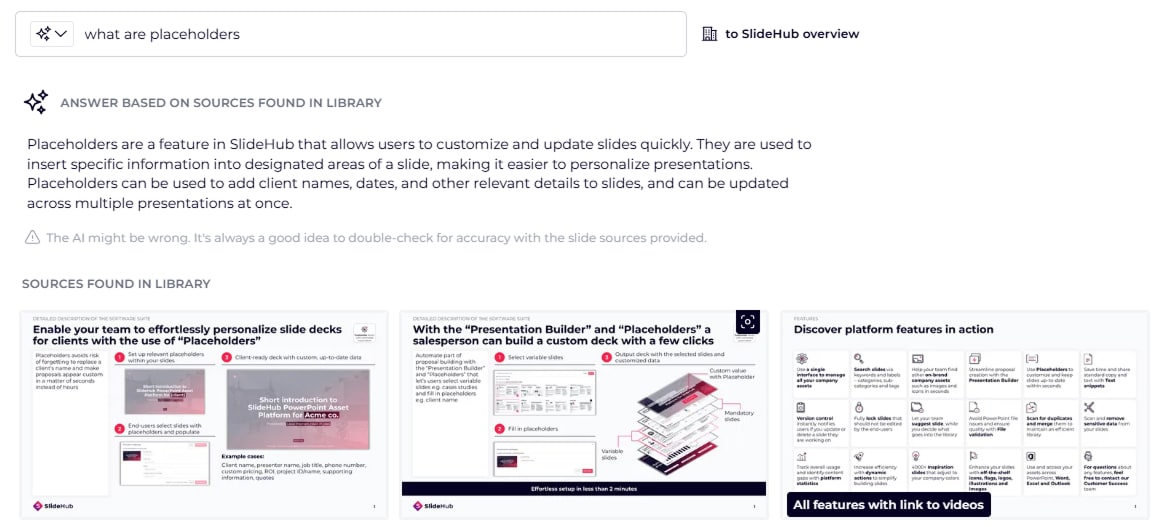
🔍 AI-Enabled Search - Access Slide-Based Information Instantly
Quickly find relevant information across your entire slide library with SlideHub’s new AI-enabled search.
This feature is especially useful when you need quick insights, want to understand a topic, or create new content based on existing slide materials.
Just type in your question or topic, and the AI will generate a response based on relevant slides from your library—along with slide references so you can see exactly where the information came from.
Note: This feature is enabled by default for new clients and can be manually turned on by existing clients in Manage View → Account Settings → Security → Enable AI Features.
AI search is powered by Typesense and Cloudflare Workers AI — One of the key reasons we chose this approach is privacy, as Cloudflare does not store any input or output from the AI model, and it’s never used for training purposes.
📂 Category Ownership – Clarify Responsibility and Streamline Content Management
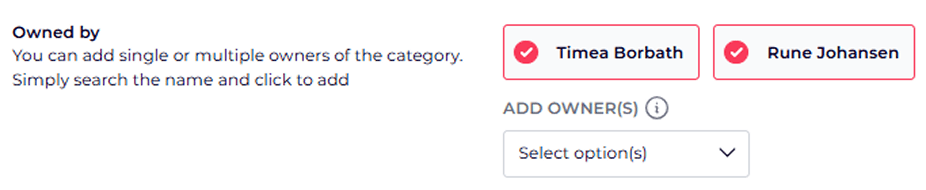
Assign owners to entire categories, not just individual assets, for clearer accountability across your content library.
This helps teams organize responsibilities based on topic, function, or expertise—ensuring that content remains accurate and up to date.
Ownership is visible during asset management, content suggestions, and updates—streamlining review processes and reducing ambiguity around who should take action.
📅 Date Picker Placeholder - Ensure Accurate and Consistent Date Entry
Replace manual date input with an easy-to-use calendar-style date picker for any of your document automation placeholders—minimizing errors and ensuring consistent formatting.
Managers can configure the placeholder to display dates in various formats and languages, ensuring consistency across all presentations. By default, the picker shows the current date, but users can select any date as needed.

📅 Don’t Miss Our Next Webinar
Join us for our next Product Update Webinar on Thursday, July 3rd at 2 PM and 10 PM CEST.
[Register here → https://slidehub.com/webinar-sign-up/quarterly-product-webinar]
We look forward to seeing you at the next webinar!
Keep up-to-date with the latest updated - Sign up for our next product webinar
Are you interested in becoming a client -Schedule a demo here
Do you need our assistance as a clients -Book a call with Customer Success